 Rose Yao

From my workbench · A setup guide
The Personal Librarian
How to turn a pile of purchase receipts into an assistant that knows your taste, tells you what you already own and haven't read, and recommends what to read next.
New to building with AI? Set up your tools first: GitHub, Supabase, Netlify, and Google sign-in, with your agent helping along the way.
Before you start — a note on scope
I use Kindle as my 99% book product, so this guide is written around Amazon's data. If you read on something else, or across several products, the steps still hold — but the key question you'll have to answer for yourself is how to get your reading history out of the products you actually use.
Whatever the source, aim to land it as JSON or CSV files the model can parse. That's the format the rest of this guide assumes, and it's what makes the whole thing portable.
The four parts
Almost everyone who tries this starts by asking a chatbot for book recommendations, gets something generic, and stops. The fix is structural: a librarian needs a job description, a catalogue, a memory, and a shelf you can look at. Those are four separate artifacts, and each one lives in a different place.
The project
Standing instructions that apply to every chat, so you never re-explain what you want.
The data
Your actual purchase and borrow history as files, attached to the project rather than to one chat.
The profile doc
What the librarian has worked out about you, written down. This is the part that compounds.
The dashboard
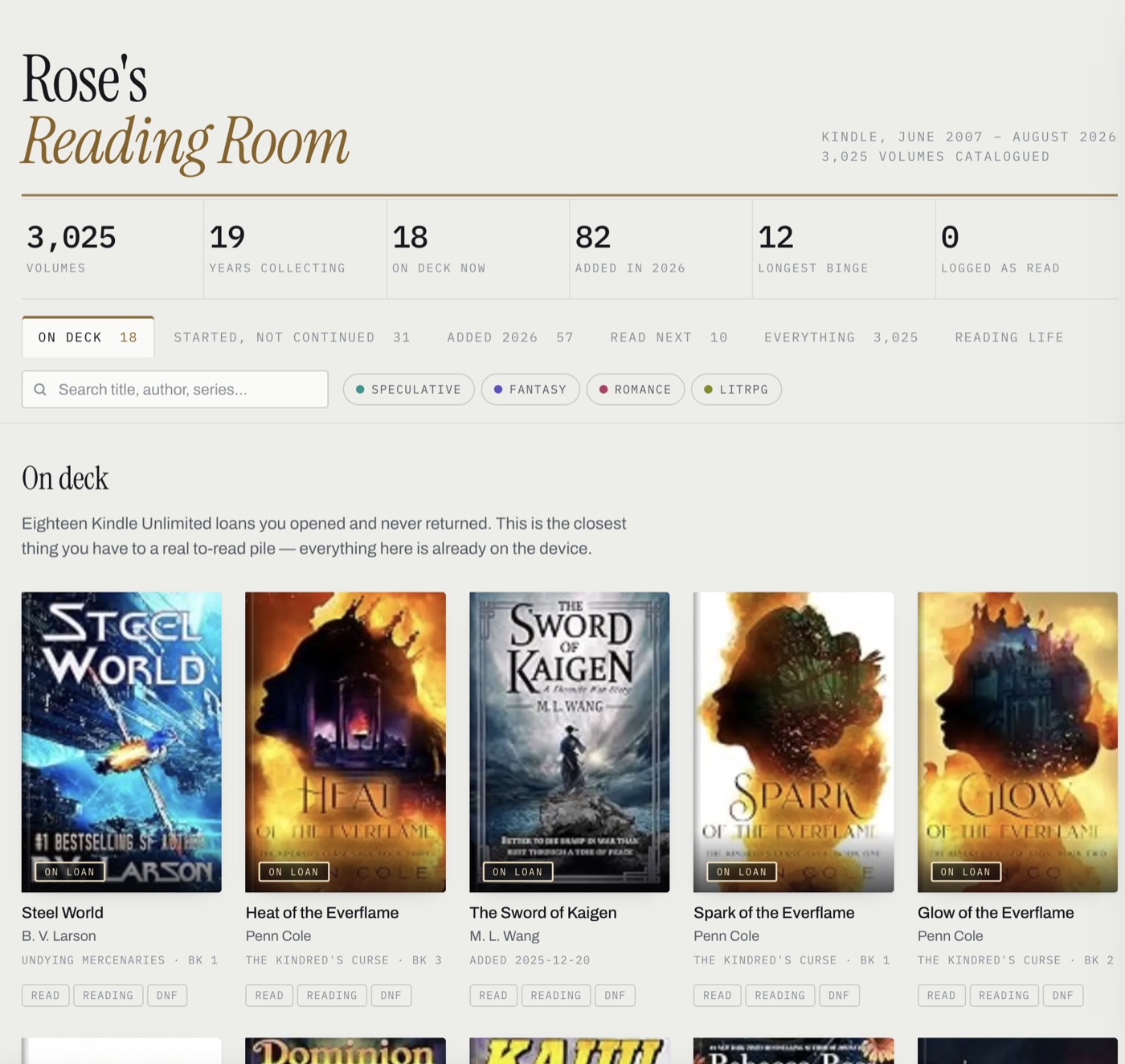
A published page with your unread shelves, your stats, and a reading log you can actually mark up.
The division of labour matters more than any single piece. Chat is the interface. The doc is the memory. The page is the view. If you skip the doc, every conversation starts from zero and you are back to generic recommendations.
Part I
The build
Eight steps, in order. Each one depends on the one before it, which is why they're numbered.
Make the project
In Claude, create a new Project and give it a name. The important field is the custom instructions box — this text is prepended to every conversation inside the project, forever. Write the job, not the format.
Instructions to paste
You are my personal librarian. Track what I've read, surface fun analytics about my reading patterns, and show me unread books I already own before you recommend anything new.
Let me search in natural language — "lighthearted romance", "books like this one", "something short and strange". Always split your answers into two lists: things I already own, and recommendations from elsewhere.
Before recommending a book, check my catalogue to see whether I already have it. Keep reading-profile.md current as you learn things about my taste.
Why this wording
"Show me unread books I already own" is the instruction that changes the character of the whole thing. Without it you get a recommendation engine. With it you get a librarian — someone whose first move is to walk you to your own shelf.
Get your data in
This is the step people skip, and it's the one that does the work. A model guessing at your taste from a conversation is a party trick; a model with sixteen years of timestamped purchase history can tell you which book you bought and abandoned in 2023.
This guide assumes Kindle, because Amazon will hand you your entire digital purchase history as CSV — it's just buried in the privacy tools rather than anywhere near your library.
- Go to Amazon's Privacy Central → Request Your Information (from Account, look for "Request Your Data" or "Your Data Requests").
- Choose a category. For books, the two that matter are Digital content ordering — every Kindle purchase, with title, ASIN and order date — and Digital borrowing / Kindle Unlimited, which includes a
Loan Statuscolumn. You can also request everything and pick out the two files later. - Confirm via the email Amazon sends. Nothing happens until you click that link.
- Wait. It usually arrives within a few hours; Amazon reserves the right to take up to 30 days, and a full-account request often does.
- The download is a zip. The files you want are
Digital Content Orders.csvandDigital Borrowed Items.csv.
Upload both to the project, not to a chat. Files attached to a project are visible to every future conversation in it; files dropped into a single chat vanish with that chat.
What's not in there
The orders CSV has no author column and no read/unread state. Every title carries an ASIN, though, and that ASIN is the key to both. Read state is important enough to get its own step — it's next. Authors and cover art are in Part II.
The columns that actually matter
| Column | Why it earns its place |
|---|---|
| Title | Obvious, but a bad join key — see rule 3. |
| ASIN or ISBN | The real identifier. Threads through to covers, authors, everything. |
| Date acquired | The single most underrated field. Powers binge detection, pace, and the sequel test. |
| Author | Deep-author relationships are the strongest recommendation signal you have. |
| Loan status | In the borrowing file. BORROWED means still checked out — the closest thing to a to-read shelf. |
On size
A few thousand rows is nothing — a 3,000-title catalogue is well under a megabyte. Ask for analysis to be done by running code over the file rather than by reading every row; counts and date arithmetic are exactly the kind of thing you don't want estimated.
Get read/unread state
Purchase history tells you what you bought. That's a different library from the one you've read, and the gap is usually enormous. Read state is what makes "show me unread books I already own" an answer rather than a guess.
Kindle already knows. Whispersync has to track your place in every book to keep devices aligned, so if you have Kindle for Mac installed, the answer is sitting in a database on your own machine — no logging habit required. Two files under ~/Library/Containers/com.amazon.Lassen/Data/Library/: Protected/BookData.sqlite for titles and series, and Application Support/Whispersync/WSyncDefault.sqlite for read state and your collections.
Point an assistant at that folder and ask it to pull read state for every book. It's a short script, not a project. Three things to tell it, because each one fails silently:
Hand these over with the request
- Read state lives in the
BookReadStatesnamespace, keyedamzn://<ASIN>/BOOK. Nearly every record saysREAD; explicitUNREADrecords barely exist, so counting only those reports nothing and looks like it worked. Absence of a record is the unread signal — with the caveat below. - Checkpoint the write-ahead log. Copy the
.sqliteand its-wal, open the copy read-write, runPRAGMA wal_checkpoint(TRUNCATE). Read-only silently returns stale state. - Ignore
ZRAWISUNREAD,ZRAWERLandpercentageRead. All three look like read state. None of them are.
Quit the Kindle app first — it flushes on quit. And drop the built-in dictionaries before you count anything; there are around forty of them, they're tagged DICT, and they'll show up as unread forever.
Absence of a record is a weak signal — check it
Most READ records carry "origin":"BACKFILL": Amazon wrote them in one sweep, and only books opened since then get new ones. So "no record" means not covered by the backfill and not opened in this app since — which is not the same as unread. A book you read on a Kindle device can easily have no record here.
Treat the count as an upper bound and reconcile it against something independent before you believe it: what the Kindle app's own unread filter shows, or the size of your "to read" collection. When those numbers diverge, say so rather than shipping the tidy one.
No Kindle app? You can still infer it. When someone loves a book they buy the next one within days, so book one owned with no book two is a decent unread marker. It's a guess, though, and a fallible one — on a real library it got about four calls wrong out of the handful anyone bothered to check, in both directions.
Build the profile
Now the first real session. The output is a document, not an answer — this is the step that turns a chat into a system.
Prompt
Read my catalogue files and write me a reading profile as a markdown doc. Include: a library at a glance (totals, first purchase, peak year, current pace); a taste map of the three to five distinct modes I actually rotate between, with real titles as evidence; my deepest author relationships and how long each has been running; and any behavioural signals you can infer about what I finished versus abandoned. Save it to the project as reading-profile.md.
Signals worth asking for
- Binge windows — six books by one author in three weeks says more than any rating.
- Acquisition pace by year — where the peaks are, and what was happening in those years.
- Returned or expired loans — a borrow you let lapse is a soft "not for me".
- Lanes that are already full — knowing where you own forty books means recommendations there should be recent releases, not new authors.
Save it, then keep saving it
Write the profile back into the project as a doc. Every future conversation starts warm, and each session should end by folding whatever it learned back into that file. The doc is the product. The chats are disposable.
Search in plain English
With the profile written and the CSVs attached, natural-language search just works — the profile supplies the taste model and the CSVs supply the inventory. What makes it feel like a librarian rather than a search box is insisting on the two-list answer.
- "Something lighthearted, under 350 pages, that I already own."
- "Books like the one I just finished — tell me why each one matches."
- "What did I buy in 2024 and never continue?"
- "I want to be scared but not grossed out."
- "What's the longest-running author relationship in my library, and have I missed anything of theirs?"
That last one is worth running once a year. A completist check against a favourite author's actual bibliography turns up gaps you'd never notice yourself.
Recommendations and a maybe list
Ask for recommendations in a fixed shape and they get dramatically more useful: one row per lane of your taste, with a column for something you already own and a column for something new. The owned column is free — it costs nothing and you can start tonight.
| Lane | Already own | New pick |
|---|---|---|
| Smart speculative | the one sitting unread since 2021 | the closest living author to it |
| Comfort romance | book one you never continued | the series that scratches the same itch |
| Epic fantasy | the borrow you never opened | something structurally similar, not just tonally |
Then keep a second doc — maybe-list.md — and ask for anything interesting to be appended to it. Split it into ready to start right now (already yours) and to get. It becomes the thing you open in a bookshop.
Trap
Recommendations are only as good as the exclusion list. Without an explicit instruction to check your catalogue first, you will be enthusiastically recommended three books you bought years ago. Ask for an "already owns, so excluded" line at the bottom of every recommendation set — it's also a fast way to catch the model inventing things.
The dashboard
Everything so far lives in text. The last piece is a page you can look at — one self-contained HTML file, published so it keeps a URL and survives the conversation that made it.
Shelves that earn a tab
| Shelf | Definition |
|---|---|
| On deck | Loans still checked out, or anything explicitly marked unread |
| Started, not continued | The sequel test made visible |
| Added this year | Recent acquisitions not already on another shelf |
| Read next | Recommendations you don't own — worth styling differently so you can tell at a glance |
| Everything | The full catalogue, searchable, no covers |
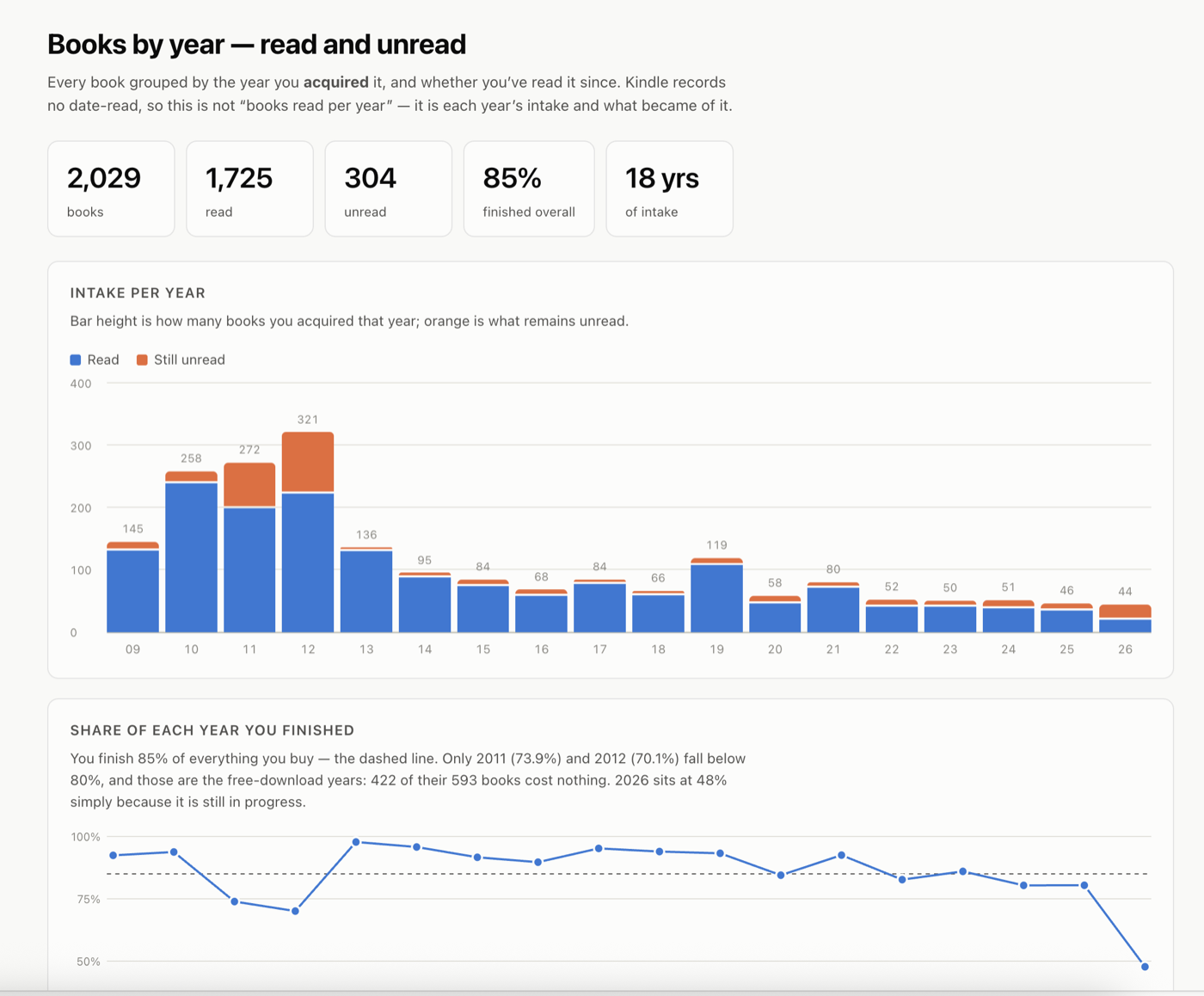
| Reading life | Per-year chart, deepest series, longest binges |
The one feature worth insisting on is a reading log: read / reading / did-not-finish, plus a rating, stored in the page itself with an export button. It's the only thing here a chat genuinely cannot do — and next session, you feed those marks back into the profile doc, which is how the system learns something the purchase data never knew.
Record the URL
Save the published page's address into a project doc. Updating means republishing to that same URL; publishing without it silently creates a second copy, and a month later you won't know which one has your marks in it.
Keep it up to date
The CSV export is a one-time snapshot; your library isn't. Two ways to refresh it, and they answer different questions.
From the Kindle app on your computer
This is the fast path and the one you'll use most: the same two databases from step 3, re-read. It gives you the current catalogue and current read state with no browser and no login — which means it also answers "what did I finish since last time?", the one question the purchase export can never answer.
Save each run as a snapshot file and diff against the previous one. Three lines come out of that diff: what's new, what moved to read, and what's still sitting there. That's the whole maintenance loop.
From the browser, when you need authors or covers
Slower, because it needs a logged-in Chrome session driven by browser automation — so save it for when you're rebuilding the dashboard. Everything else the local databases already have. Part II has the mechanics.
Put it on a schedule
Once the refresh is a skill, it can run without you. A scheduled task attached to the project — monthly is about right — runs the sync, diffs against the last snapshot, and reports back in three lines. The unread list stops drifting, and you stop being the thing that remembers to update it.
Keep the cadence modest. Reading changes on the scale of weeks; a daily job just generates noise you'll learn to ignore.
Write it down as a skill
Save the refresh as a reusable skill rather than rediscovering it every few months. The valuable content is not the happy path — it's the trap list. A skill that opens with "here are the three fields that look like read state and aren't" saves an hour every time.
Worth including: where each piece of data lives, the traps, a fast path and a full path, what files it writes, and a sanity check against a known baseline count so a bad run announces itself. Then add the two steps a script can't do — put the fresh unread list back into your project, and fold what changed into the profile doc.
And the human half
Start a session by folding your dashboard's read/DNF marks into the profile doc. That's the only input in the whole system that records what you thought of a book, rather than what you did with it.
Part II
The advanced layer
One optional job: getting author names and cover art out of the web library. You only need this if you're building the dashboard — skip it and Part I still stands on its own.
Authors and cover art
Two things neither the CSV export nor the local Kindle databases can give you — the orders file has no author column, and the sync database keeps authors as encrypted blobs. Both come from the web library at read.amazon.com/kindle-library, which means a browser you're logged into; a sandboxed environment can't reach it.
Authors
The library page is not a normal XHR app. Item data is embedded in the initial HTML document as JSON under "itemsList", and pagination re-requests the same document route with a paginationToken. There is no search API; don't go looking for one. Roughly 40 pages of 50 items covers a 2,000-book library in under a minute.
Getting the result out is its own problem — browser tooling typically truncates console output long before a 2,000-record array. Have the page build a Blob and trigger a download instead, then read the file off disk.
Covers
Every cover is public at a predictable URL, keyed by ASIN:
https://m.media-amazon.com/images/P/{ASIN}.01._SY500_.jpgFetch each one in the browser, draw it to an OffscreenCanvas at 280px wide, encode as WebP at quality 0.62, and read it back as a data URI. That lands around 13KB per cover — a hundred covers add roughly 1.6MB to the page, which keeps a single-file dashboard comfortably portable. Cache the {asin: dataURI} map to a file so you never re-fetch a cover you already have.
Two mistakes worth avoiding
- Thread the ASIN through from the source row. Re-joining by title later invites prefix-matching bugs, and a book with the wrong cover is worse than a book with no cover.
- Trust the source's author field over the model's recall. Hand-filled author names sound confident and are wrong often enough to matter. When the catalogue and the model disagree, the catalogue wins — verify by ASIN rather than arguing about it.
Five rules, if you only remember five
- 01The doc is the product, not the chat. Anything worth knowing next month gets written to a file.
- 02Get real read state before you infer it. Behavioural guesses are decent and still wrong often enough to embarrass you.
- 03Join on identifiers, never on titles. ASINs and ISBNs are boring and correct; title matching fails quietly.
- 04Source data beats model recall. When the export and the model disagree about who wrote something, the export is right.
- 05Recommend against an exclusion list. A librarian who suggests a book already on your shelf isn't a librarian.